Running a service program takes a whole team: a program director, campus coordinators, club advisors, a principal who wants to keep an eye on things, and the nonprofits where your students actually serve. Helper Helper gives each of them their own login, scoped to exactly what they need. Four admin roles cover everyone inside your school, and free partner accounts bring your community organizations into the process without adding work to your plate.
Admin Role Comparison Four roles, one flexible system
Helper Helper offers four admin roles, each scoped to a different level of responsibility. The first three build on each other: a Branch Admin can do everything a Team Admin can, and an Institutional Admin can do everything a Branch Admin can, just across a wider slice of your school. Organization Admin is a separate track for outside partners.
Institutional Admin
Full access across the entire institution. Sees every volunteer, team, and event, runs school- or district-wide reports, manages all rosters and organizations, and is the only role that can create other Institutional Admins, change school settings, customize the mobile app, or message the whole school. Built for program directors and district administrators.
Team Admin
Scoped to one or more teams such as NHS, a class, or a club. Sees only their team members, manages the team roster, adds members to events, validates and edits their hours, views their photos and survey responses, and runs team reports. Creates events for their teams and edits any event limited to teams they manage. Ideal for club advisors and coaches.
Branch Admin
Scoped to higher-level groups when team tiering is warranted by your account size or structure (for example, schools, parent teams, counselor teams, etc.). Sees the volunteers, teams, and events in their branch, uploads its rosters, creates teams and Team Admins inside it, adds organizations and invites partners for the branch, validates hours, and runs branch and team reports.
Organization Admin
Designed for community partners. Creates and edits events for their own organization, manages signups and waitlists, messages attendees, and checks volunteers in with QR codes and the coordinator check-in link. Sees attendee lists for their own events only, never your rosters, reports, or photos, and only the surveys you choose to share.
How Teams and Branches Work
Every role is scoped to the way your school is organized in Helper Helper. Volunteers belong to one or more teams, such as NHS, Key Club, a graduating class, or a sports team. Larger accounts can also turn on branches. A branch is simply a group of teams. Most often it is a campus, building, or school within a district, but it can be any set of teams that belongs together. A single school with a handful of clubs usually needs only teams. A district, a multi-campus school, or any account with dozens of small teams adds branches on top.
- Volunteers can belong to several teams. A student in both NHS and Key Club appears on each team's roster and in each team's reports, seeing opportunities targeted at the whole institution or either team.
- Events, goals, surveys, and messages can be targeted. Any of them can be limited to specific branches or teams or left open to the whole account.
- Reports roll up the same way. Team and branch reports show just their slice of the data, and the institution report shows everything.
- Branches keep large accounts tidy. When every homeroom teacher or counselor has a team of their own students, or when parents join on parent teams alongside their kids, those teams can be gathered under a branch so they do not clutter the rest of the account. A Branch Admin oversees the whole group while each Team Admin still sees only their own students.
- Each branch runs on its own terms. A branch can have its own time zone, opportunity categories, and organizations, so a campus in another state or a school with different community partners is not tied to the rest of the district.
Community Partner Access
Your community partners are essential to your service program, and the Organization Admin role is built for them. Invite a partner to create a free Helper Helper account linked to your school. They can post opportunities that appear in your students' feed, manage their own signups, and verify attendance, and their verification flows straight into your reports.
What Partners Can Do
- Post events and manage their own volunteer opportunities from start to finish
- Manage signups with a clear view of who's registered and how much capacity remains
- Verify attendance with simple approval tools that confirm student hours
- Message attendees with updates and reminders delivered by push notification or email
- See shared survey responses so they can collect information or waivers their organization requires

“One pleasant surprise has been how much our community partners appreciate the system. Once opportunities are posted, students can sign up easily, and we use QR codes to validate and check in volunteers.”
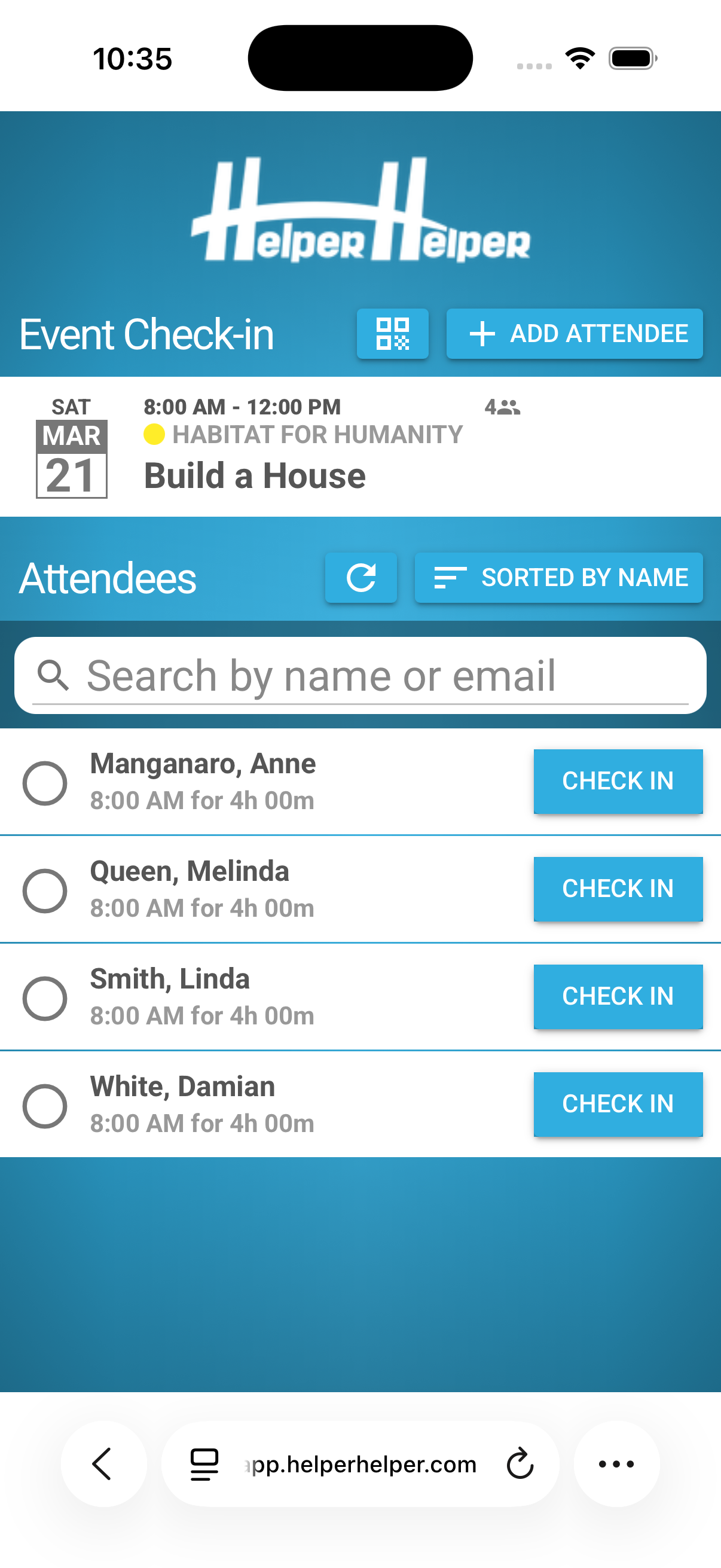

Coordinator Check-In Links
Every event includes a unique check-in link that is emailed to event coordinators in advance. Coordinators use this link (pictured on the left) like a kiosk to quickly check users into the event and validate their attendance with one click.
Community partners will see their coordinator links on any events they create. And if you don't want to offer a partner their own Helper Helper account, you can share this link with an outside partner to let them manage their event attendance without any account needed.
Oversight Stays With You
Delegating access never means giving up control. Administrators approve new partners, review every event listing, and set parameters for what partners can and cannot do. Messaging is scoped the same way: partners can only reach students who signed up for one of their own events, never your full student body.
Inside your school, setting up an admin takes seconds. Invite a new admin, assign their role, and optionally scope them to a specific branch or team. They immediately see only what they're supposed to see. When responsibilities shift mid-year, changing someone's role is just as fast. No need to rebuild accounts or migrate data.
View-Only Mode for Any Role
Any admin account can be set to view-only. A view-only admin retains full visibility into reports, student records, and program data at their permission level, but cannot make changes to anything. They can't edit events, modify rosters, validate hours, or alter settings.
This is perfect for principals, counselors, or district administrators who need to monitor the program and pull reports but shouldn't be making day-to-day edits. It's also useful during audits or accreditation reviews, when you want to give a reviewer access to see the data without any risk of accidental changes. Grant access with confidence, knowing the data stays exactly as it is.
Common Setups
Program Director
Institutional Admin with full access to manage the entire service program across all campuses and teams.
Principal / Counselor
Any role set to view-only. Full visibility into reports and data at their level, with no ability to make changes.
District Administrator
Institutional Admin set to view-only. Can see reports and data across all schools without altering anything.
Community Partner
Organization Admin for their nonprofit. Posts and manages their own opportunities and validates hours via the check-in link.
Campus Coordinator
Branch Admin scoped to one building. Manages that campus's events, rosters, and hour validation independently.
NHS Advisor
Team Admin for the NHS team. Manages the NHS roster, validates NHS-specific hours, and edits NHS events.