No two service programs run the same way. Some events need a single signup, others need morning and afternoon shifts across multiple days. Some track volunteer hours, others just need attendance. Helper Helper gives you the tools to build every event exactly the way you need it.
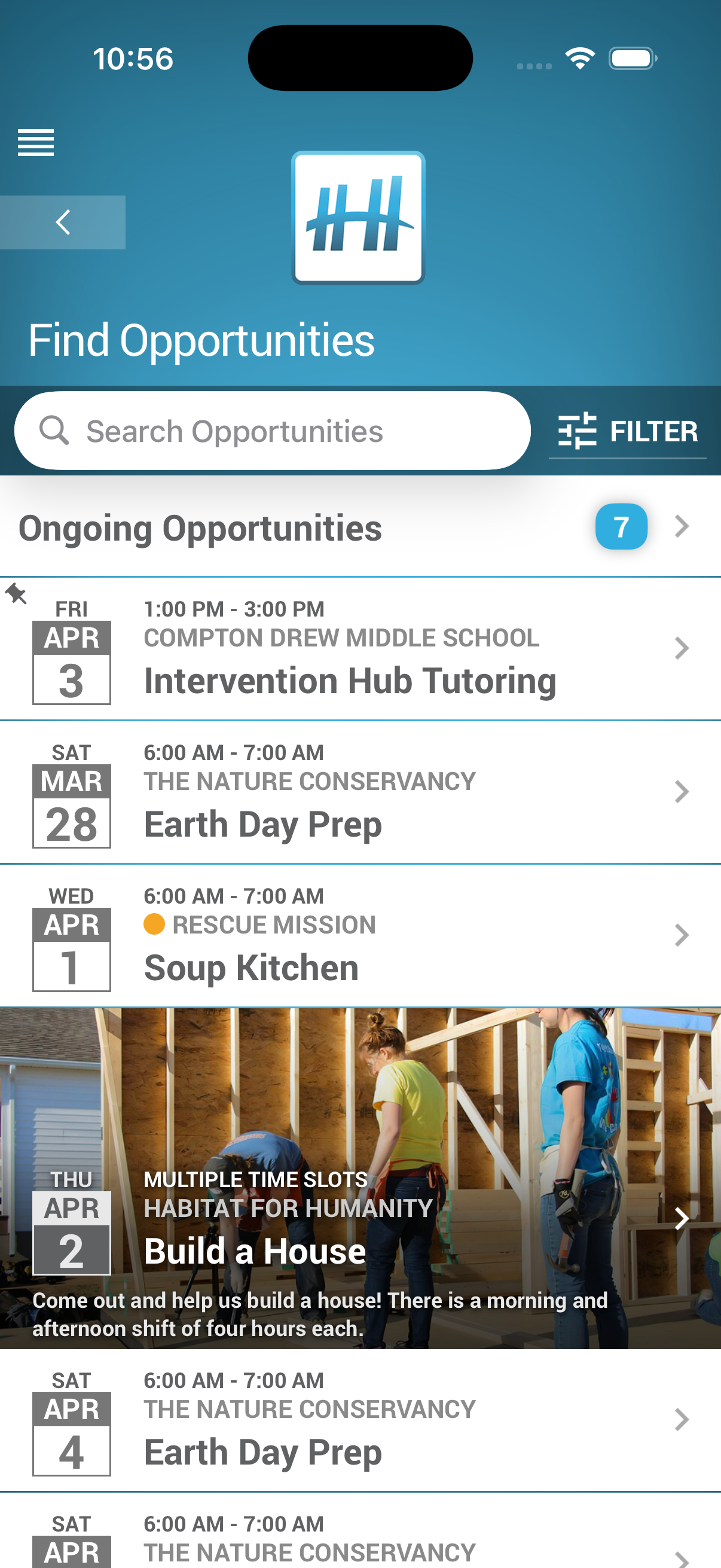

Multiple Time Slots
Create events with as many time slots as you need — each with its own date, time, and participant cap. Whether you're running an all-day event with morning, afternoon, and evening shifts, or a week-long drive with different daily options, volunteers see every available slot and sign up for the ones that work for them.
Set individual capacity limits per slot so you always have the right number of people at the right time. Students browse available slots in the app and commit to the ones that fit their schedule.
Recurring Events
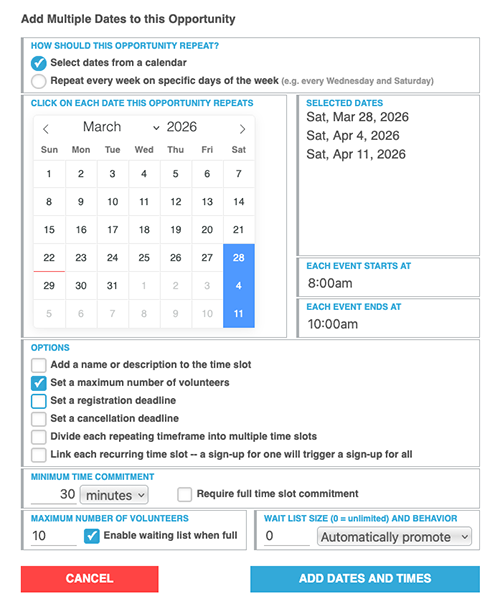
Stop recreating the same event over and over. Set up once and Helper Helper generates entries across all your dates automatically.
Two ways to set dates:
- Pick from a calendar — select specific dates for events that happen on irregular schedules
- Weekly recurrence — choose a start date, end date, and which days of the week to repeat
Linked Time Slots
For multi-day commitments like summer camps, training series, or educational classes, linked time slots let you tie dates together so that signing up for one automatically signs the volunteer up for all of them.
Create multiple linked groups within a single event — for example, a morning group and an afternoon group — and optionally name each group so volunteers know exactly what they're committing to. If a student needs to drop a single date later, they can remove that individual commitment while staying signed up for the rest.
Waiting Lists
Popular events fill up fast. When a time slot reaches its participant cap, students can add themselves to a waiting list instead of missing out. If someone cancels, the next student in line is signed up or notified automatically, so spots never sit empty and you never have to manage the shuffle by hand.
Attendance-Only Tracking
Not every event should count as volunteer hours. Attendance-only events let you track signups, RSVPs, and check-ins without adding hours to students' service records.
Use it for meetings, training sessions, donation drives, snack sign-ups, guest speaker events, or anything where you want organized signups and attendance tracking but don't want to inflate volunteer hour data.
Featured Images & File Attachments
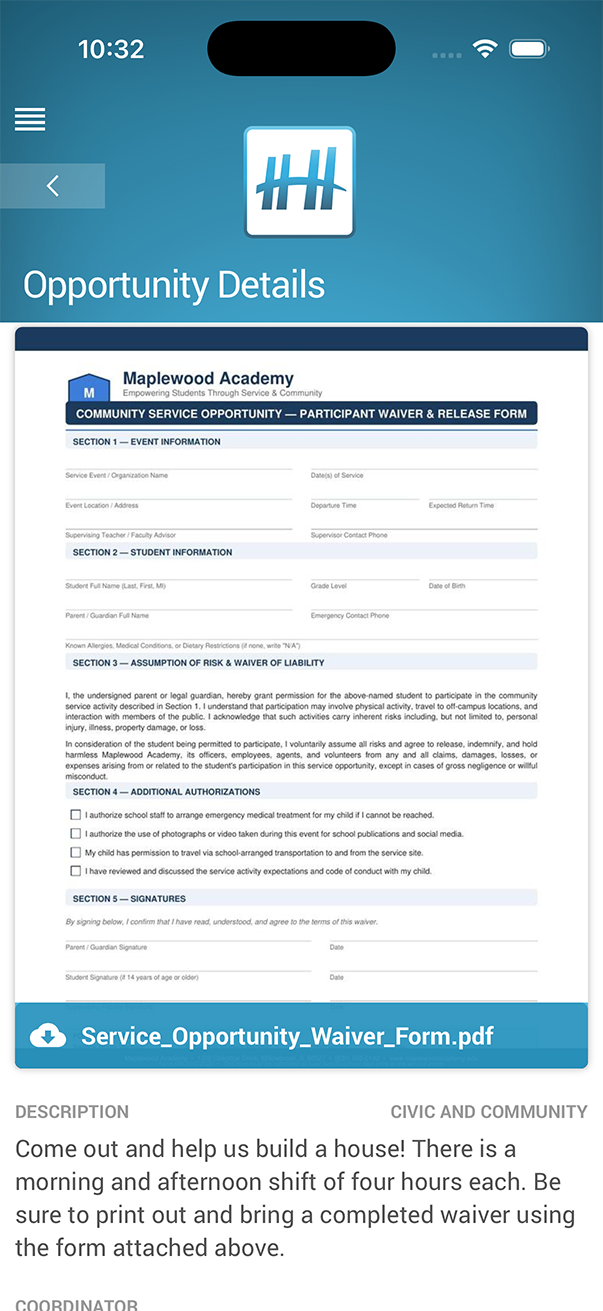
Make events stand out and give volunteers the information they need up front. Attach photos, flyers, or documents to any event so students know exactly what to expect before they sign up.
- Waivers & documents
Upload required forms as downloadable PDFs so volunteers come prepared - Flyers & posters
Attach marketing materials so students can share event details with friends - Photos
Show the location or past event highlights. A compelling image gets more signups.
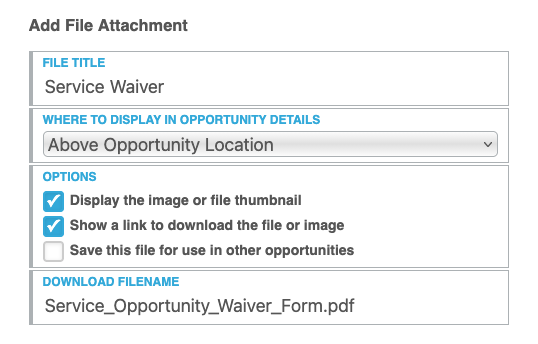
Save files to reuse across events so you don't need to re-upload the same logo or waiver every time.
Choose whether to display a preview of the file, offer a download link, and where to display this file.
More Ways to Customize
Participant Caps
Set maximum participant limits on individual time slots to keep events manageable.
Targeted Events
Direct events to specific groups or the entire school. Students only see the ones relevant to them.
Custom Surveys
Attach pre- and post-event surveys for reflections, waivers, or data collection.
Waiting Lists
When a time slot fills up, students can join a waiting list and get signed up or notified automatically when a spot opens up.
Custom Categories
Organize events into color-coded, searchable categories that match your program structure. Categories also power your reporting.
Cancellation Deadlines
Set a cutoff for when volunteers can cancel to prevent last-minute drops. Registration deadlines prevent late signups.